 English
 Ukrainian


VSCodium is a community-driven, freely-licensed binary distribution of Microsoft’s editor VS Code.
Why to use Vscodium?
- Zero Telemetry: VSCodium removes all telemetry tracking by default, ensuring your keystrokes and usage data are not sent back to Microsoft.
- 100% Open Source (FOSS): It is a community-driven, MIT-licensed fork, making it ideal for those who prioritize open-source software and transparent development.
- Identical Experience: Because it is built from the same source code as VS Code, it offers the same features, theme support, and functionalities.
- Extension Freedom: It uses the Open-VSX registry, a community-driven marketplace, allowing you to find many of the same plugins, while still allowing manual installation of some proprietary extensions if needed.
- Privacy and Security: Suitable for developers and businesses that require high data security and prefer not to have usage data collected.
VSCodium is essentially for developers who love the functionality of VS Code but want to avoid the "Big Brother" aspect of tracking and proprietary, closed-source additions from Microsoft.
First step installation
I use the snap version
snap install codium --classic
Extensions I'm using
In the vscode I have installed these extensions:
I don't use settings sync.
Let's check if we can have the same/similar free extensions in Codium.
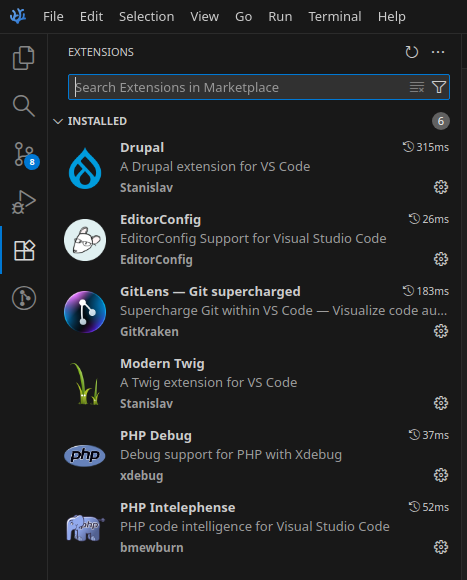
Here's the repository https://open-vsx.org with free Codium extensions.
The good thing is that you can download .vsix files and store extensions locally!
I didn't find any good extension for PHPDoc completion.
The next thing is to setup correct settings for PHP and one of them is select variable with dollar sign! Open the Ctrl+Shift+P, type settings and fine Preferences: Open User Settings (JSON) and add there a bunch of parameters. Save it and it will be applied automatically. It's a settings for all opened files/workpsaces.
Codium json settings file should be located at $HOME/.config/VSCodium/User/settings.json.
{
    "gitlens.hovers.currentLine.over": "line",
    "gitlens.currentLine.pullRequests.enabled": false,
    "gitlens.codeLens.enabled": false,
    "gitlens.hovers.enabled": false,
    "workbench.editor.empty.hint": "hidden",
    "workbench.editor.wrapTabs": true,
    "php.validate.executablePath": "",
    "php.debug.executablePath": "",
    "gitlens.launchpad.indicator.enabled": false,
    "editor.renderWhitespace": "all",
    "editor.hideCursorInOverviewRuler": false,
    "editor.overviewRulerBorder": false,
    "editor.rulers": [
        80,
    ],
    "files.insertFinalNewline": true,
    "files.trimTrailingWhitespace": false,
    "breadcrumbs.enabled": true,
    "editor.wordSeparators": "`~!@#%^&*()-=+[{]}\\|;:'\",.<>/?",
    "workbench.colorTheme": "Dark Modern"
}
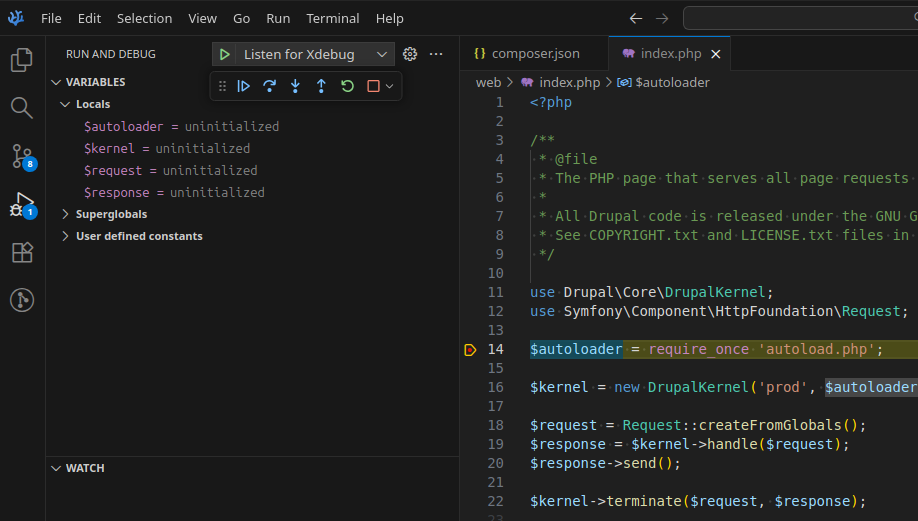
Add a breakpoint in the index.php of the current Drupal projectm, press F5 to check if Xdebug is working.
Useful links
- VSCodium github https://github.com/VSCodium/vscodium
- VSCodium website https://vscodium.com/
- Extensions https://open-vsx.org